 Hobby Armory
- Hobby Armory
- Paint Recipe App
Six months later, you still know how you painted it
You mixed the perfect armour tone, finished the squad and moved on. A year later you buy two more and the recipe is gone. Hobby Armory keeps the whole recipe, step by step, linked to the models it belongs to, and it knows which of those paints are still on your shelf.
- 5,900+ paints from 13 brands
- Paint Rack and colour tools
- Painting timer
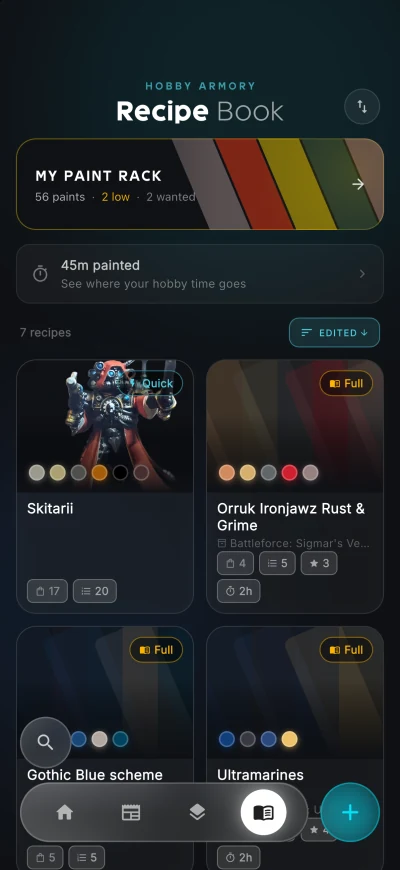
Nearly 6,000 paints, already in the app
You never type a paint name or guess a hex code. Every pot below is in the catalog with its range, its type and a measured colour, so you pick the paint you actually used and the colour tools can compare it across brands.
- Games Workshop
Citadel and Warhammer Colour
940+Base, Layer, Shade, Contrast, Dry, Technical, Air and the new Tone Pro, under both the old Citadel label and the new one, plus the retired Foundation paints.
- Acrylicos Vallejo
Vallejo
1,190+Model Color, Model Air, Game Color, Xpress Color, Mecha Color, Panzer Aces, Arte Deco and True Metallic Metal, washes and primers included.
- AK Interactive
AK Interactive
1,030+3rd Generation acrylics, Real Colors, Quick Gen and Dual Exo, from figure paints to AFV and aircraft sets.
- The Army Painter
The Army Painter
720+Warpaints Fanatic, Speedpaint 2.0, Warpaints Air, Historical, the John Blanche set and Nolzur's Marvelous Pigments.
- Reaper Miniatures
Reaper
430+Master Series Paints in the Core, Bones and Pathfinder lines.
- Scale75
Scale75
370+ScaleColor, Fantasy and Games, Warfront, Scale Artist, Instant Colors and Metal n Alchemy.
- AMMO
AMMO by Mig Jimenez
270+The acrylic range, Atom and the Figures Paints.
- Green Stuff World
Green Stuff World
230+Acrylics, Dipping Inks, Chameleon Colorshift, chrome and metal paints and fluorescents.
- Monument Hobbies
Pro Acryl
210+The core range, Expert Acrylics, the Signature series, transparents and PRIME.
- Duncan Rhodes Painting Academy
Two Thin Coats
210+Waves 1, 2 and 3 with their washes, glazes and metallics, and the Dark Arts set.
- Privateer Press
P3
130+The Formula P3 range.
- Turbo Dork
Turbo Dork
80Metallics, Turboshift and Zenishift colourshift paints.
- Kimera Kolors
Kimera Kolors
60+The Base Set, Colors of Nature and the artist signature sets.
Already own a shelf full? Paste your list of paints and the app matches each line to the catalog, so your rack is filled in one go. Discontinued paints stay in, so an old recipe still names the pot you used, and new releases are added as they come out. A paint that is not listed yet can go on your rack as your own, and a colour that looks off can be reported from the paint itself.
Linked to the models, not filed in a folder
Nobody writes their recipes down, because with the pots open on the desk it seems impossible to forget. Then the army sits for a year and the shade of the armour is a mystery.
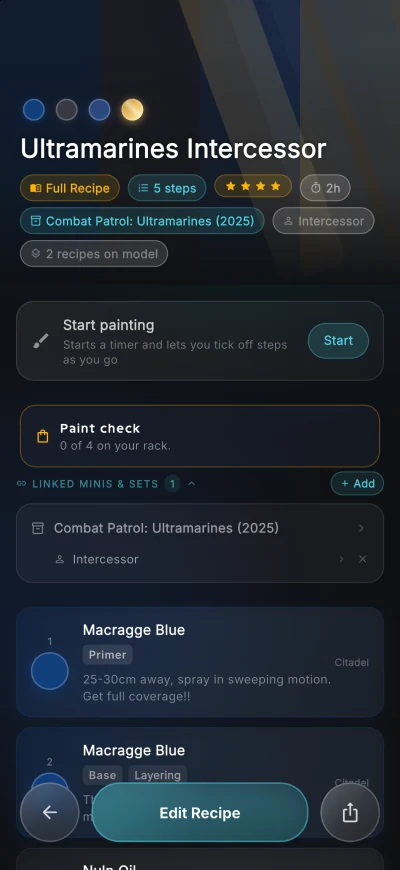
In Hobby Armory a recipe is not a loose note. It is linked to the box and the unit it painted. Open the Intercessors in your collection and the scheme is on the unit, where you will actually look for it.
- Quick recipes as a list of colours, or full recipes with ordered steps and techniques
- A note on each step for thinning, brush or how you applied it
- Up to three photos per recipe
- Paint check: how many of the recipe's paints are on your rack
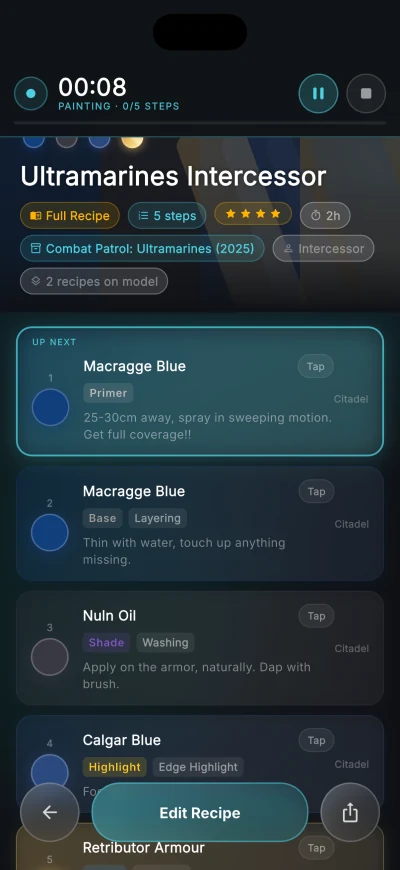
Paint from the recipe, with the clock running
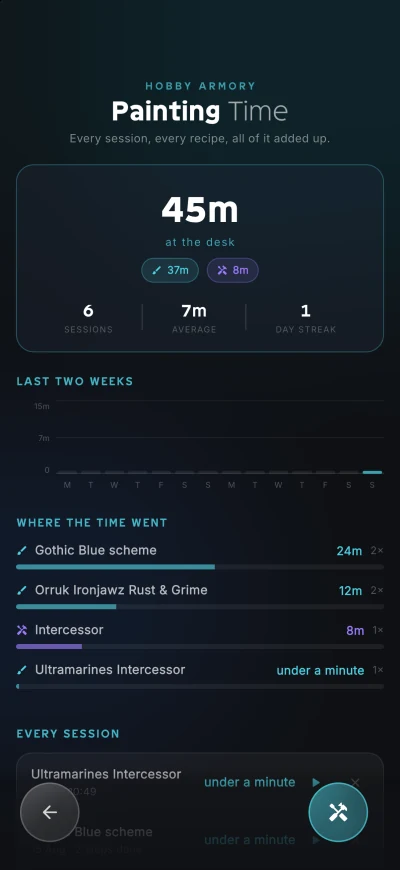
Painting mode turns a recipe into something you work through. Steps tick off as you go and a timer runs while you paint. Building sessions count too, so the evening spent clipping and gluing a box is on the record.
Time adds up per recipe and per miniature, which is the only honest way to find out what a ten model squad costs you in evenings.
The Paint Rack knows what is on your shelf
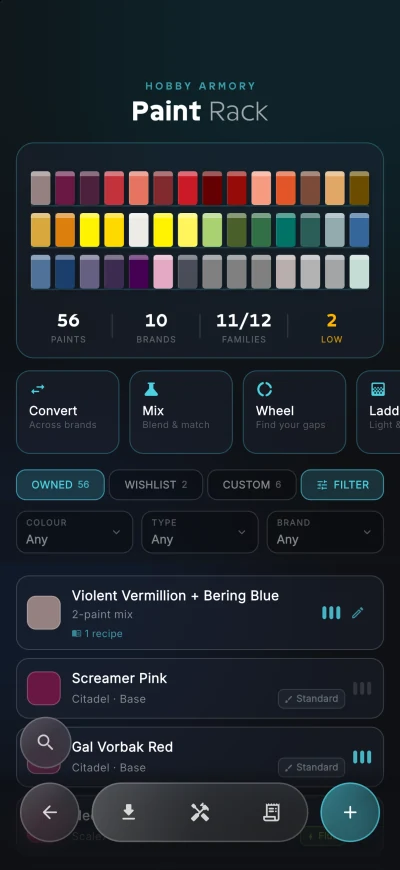
A recipe is half the answer. The other half is whether you can paint it tonight. The Paint Rack is a paint inventory: mark the paints you own, keep a wish list, flag the ones running low and add your own custom paints and mixes.
Once it knows your shelf, every colour in the app comes with matching paints from the brands and from your own rack, so a recipe you found online turns into a shopping list of the pots you are missing.
Colour tools that measure, not guess
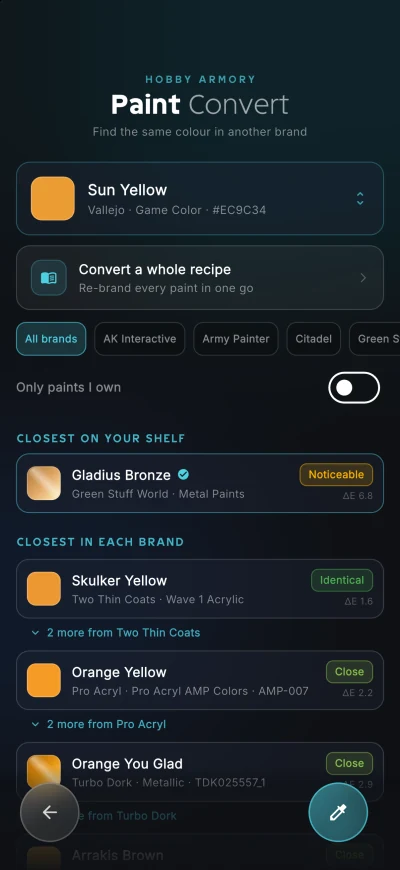
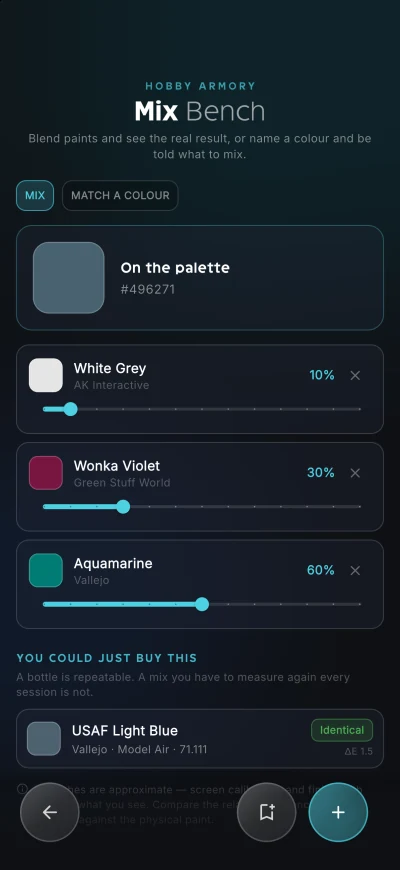
The tools run on real colour distance rather than comparing hex codes, and every match says how close it is, from identical to noticeable.
- Convert: the closest colour in each other brand, for one paint or a whole recipe
- Mix: blend three or more paints and see the result, or name a colour and be told what to mix
- Wheel: where the gaps in your paint collection are
- Ladder: one colour turned into its highlights and shadows
A palette out of any photo
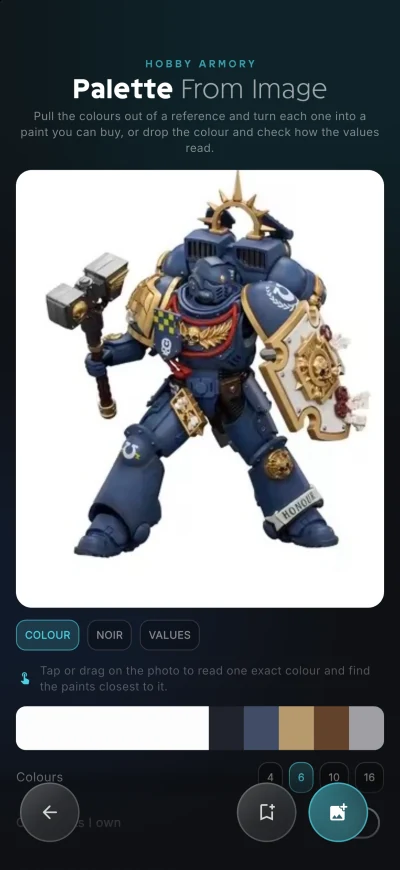
Add a photo of a model you like and the app works out which colours are in it and matches each one to real paints. Tap or drag on the photo to read one exact colour, and switch to Noir or Values to judge the contrast before you pick up a brush.
Recipes travel with community photos
When you share a photo of a painted model with the community, you can attach the recipe that painted it. Anyone who sees that photo in their own collection gets a "Painted with" link, can read the recipe and save a copy to their own book. Recipes also share as plain text or a link that imports straight into another user's book.
Works for every system
The recipe book is not tied to a game. It covers Warhammer 40,000, Age of Sigmar, The Old World, Warcry, Underworlds and anything you track in a system of your own. Finished models update your painting progress on their own.
Paint recipe app questions
Is there an app to save Warhammer paint recipes?
Yes. Hobby Armory has a paint recipe book with over 5,900 paints from 13 brands already loaded, including Citadel, Vallejo, The Army Painter, AK Interactive and Pro Acryl. You write recipes step by step, attach up to three photos, and link them to the miniatures in your collection. It is free during the beta on Android and iOS.
Which paint brands are included?
Over 5,900 paints from 13 makers are loaded: Vallejo, AK Interactive, Citadel and Warhammer Colour, The Army Painter, Reaper, Scale75, AMMO by Mig Jimenez, Green Stuff World, Pro Acryl, Two Thin Coats, P3, Turbo Dork and Kimera Kolors. You pick the paint you used rather than typing its name, and anything missing can be added as your own paint.
Can the app track which paints I own?
Yes, that is the Paint Rack. Mark the paints you own, keep a wish list of the ones you want, note when one runs low, and add your own custom paints and mixes. A recipe then tells you how many of its paints are on your rack.
Can I convert a paint recipe to another brand?
Yes. Convert finds the closest colour in each other brand, for one paint or a whole recipe at once. Matching works on measured colour distance rather than hex codes, and each match says how close it really is.
Can I mix paints in the app?
Yes. The Mix Bench blends three or more paints and shows the result, or works backwards from a colour you name. When a bottled paint already matches the blend, it tells you, because a bottle is repeatable and a mix is not.
Can the app work out the colours in a photo of a miniature?
Yes. Palette from Image extracts the colours from any photo you add and matches each one to real paints, with Noir and Values views for judging contrast. Tap anywhere on the photo to read one exact colour.
Does the app track how long I spend painting?
Yes. A timer runs while you work through a recipe in painting mode, and building sessions cover the clipping and gluing. Time adds up per recipe and per miniature.
Can I share my paint recipes?
Yes. Share a recipe as text or a link that imports straight into another user's book, or attach it to a photo you share with the community, so others see what painted it.
It all runs off one collection
Bring your collection in
Hobby Armory is in open beta on Android and iOS. It is free while the beta runs, every feature included, and there is no waiting list.
A web version for desktop is coming soon.